Want to Plan a Reunion? Read on…
Scroll down to updates to get my latest progress report and skip all the BS.

Stop and ask your self, “What the hell are you thinking?”
Last year, my ship reunion, scheduled for our old home port in Pearl Harbor got COVIDed. In June, missing a return to Hawaii and seeing old shipmates, I asked Darla (my wife) shouldn’t we have a ship’s reunion in some place exotic like…. Cleveland!
I’m retired with time on my hands, What the hey? Floated the idea in a text to a couple of buddies. With their positive reaction, I ask the question on our long standing Ship’s reunion FB page (with about 450 members). The consensus was September would be good. I said, NO PROBLEM, I can make that happen… HOW HARD CAN IT BE??
Well…
I got a rude awakening when the first hotel asked me for credit card authorization good for at least $20,000. WHAT???? Got to guarantee a minimum spend for your group, they said.
The purpose of this page is to share my LESSONS LEARNED so others may benefit. Right now I am just trying to capture the info as I go, your $0.02 is welcome. I would appreciate any VOC (voice of the customer) or alpha tester participation that would help develop the tools describe below; however, if you feel it necessary to correct my grammar, spelling, or play PC police, fee free because I have my delete button on a hot key!
You may contact me ff1073.2021@gmail.com
Brief Status
I have the purchasing, receipt management, transaction saving & retrieving functions working with a few buttons from a single DASHBOARD running VBA (Visual Basic for Applications) in MS Excel. Below is a screen shot of the dash board as it stands on 8/17/2021.

Managing all the moving parts.
This section I will endeavor to answer the question, How hard can that be? If you are planning a family reunion for mom, dad, cousin Becky and Aunt Ruth, this is way overkill. But as I mentioned, our Reunion website has over 450 members, many of the vendors want your credit card to guarantee a minimum spend and you are trying to organize multiple group events, Then you need a system to manage your reunion.
I am assuming, like me, a Cheap A$$ DIYer, engineer that decided to build my own system based on Microsoft Office suite and simply write a few VBA macros to help automate the reunion planning process, you’re thinking…. How hard can it be?
I will show you a diagram of my system now. It’s a work in progress, constantly evolving every time I have an “OH CRAP!” moment. Don’t be afraid… I’ll explain as we go, and when this is done, you’re not going to be a professional event planner, but hopefully will have very few “OH CRAP!” moments.
System — Functional Overview
Sending a 100 emails is a PITA! So at the heart, I want a tool that generates a form letter based on the contents of my data base. I NOW have a Dashboard that manages all my data. The Dashboard can also send an appropriate email via outlook depending on what I’m trying to do. The email has addresses, some appropriate salutation and applicable opening text message, in its Header and Top Text portion. (refer to diagram below). I also contains a copy of part of my Excel sheet that is formatted to look like a form– This part of the Excel sheet is what I call the Dashboard. Then it has some final text append after the Dashboard. Since nowadays this can all be done in HTML, it is easy to embed a button to PayPal or any link like the Hotel reservation site in your email. This function is the crux of my system. The GOAL!
You will find a more detailed description latter on in this document . Continue on, below is the rest a brief introduction — the functional overview.
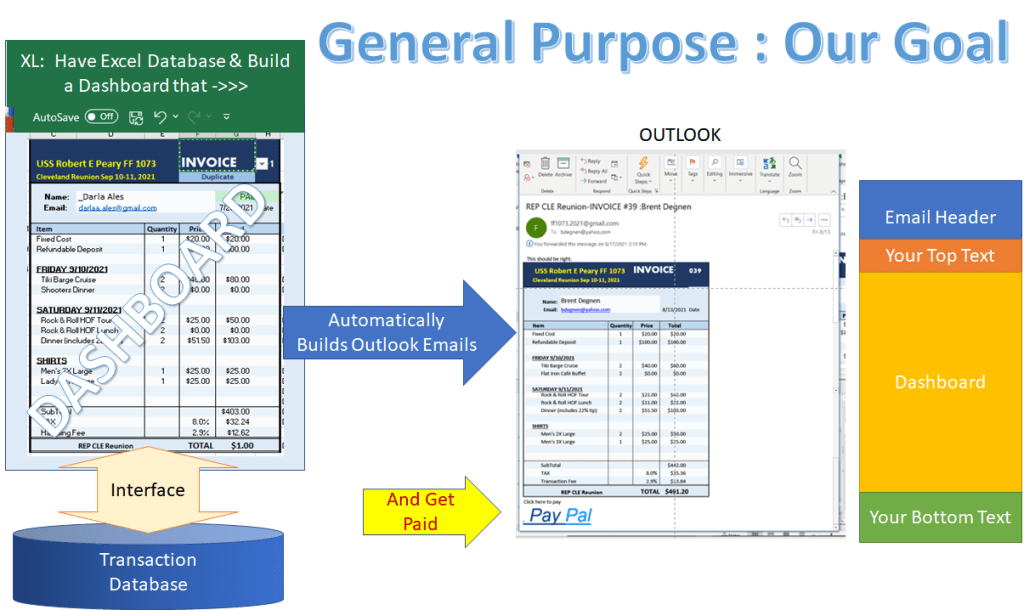
Vision: Where I’d like to be at the end.
This started off with a goal of leaving a tool for my successor so they would have an easier time managing he next ship’s reunion. Perhaps this will find broader application? One day I just got started Engineering and my instincts took over! To paraphrase Forest Gump— I just felt like engineering!! What’s the old adage, “The marketing guy has to shoot the engineer before he can ship product?” I may not finish, but right now it’s all about having fun! … As sick as my non-engineering friends may find that.
Below is a system flow diagram. The blocks represent some data input and output boundaries. These blocks may operate on the data like multiply quantity times price to get an extended price or simply save data in some sort of a data base. The arrows represent the activities of moving data from block to block, this is usually the PITA part (Pain In The A$$). The Brown arrow represent things you still have to do manually, however the good news is, the number of blue arrows that show what’s been automated is on the rise! One goal is to make all the brown arrows blue.
The other problem with huge spreadsheets is… how in the world do you find anything once you put it away. My other goal is to create a Dashboard that help you find data and move easily, without making transcription mistakes.
Progress As of 8/17/2021

Initial Posting 8/2/2021

Dashboard and Databases
The idea is to keep all related data on a separate work sheets as databases and manipulate these from a common User Interface I’m calling a Dashboard. So far I have the following databases defined:

- Guest_DB Defines the guest_ID to link databases and contains all guest information to maintain the outlook mailing list and any personal tidbits that may be of interest. One row for a guest. I envision a Create & Edit Guest dashboard function and an auto-exchange/update with Outlook Contacts list. (Implemented Rev1 on 8/17/2021)
- SKU_DB After Stock Keeping Unit, this is the inventory, how many have signed up and if there are a limited number of units ie we did a river cruise with a maximum of 30 guests. Also holds the current pricing and make for a good place to add a link to the vendor website and the folder you always can’t find that has all the contracts and junk they send you Item per row. I envision a Create new item dashboard function. (Under Construction)
- PO_DB Translates the survey Sign up sheet into Purchase Order Request item from which a NEW Invoice can be created. This is my original spreadsheet, kind of a manual mess right now, but works with LOTS of babysitting. Right now you have to manually update he order DB (PO_DB actual sheet name) by reviewing the Survey results one page at a time. Easy survey dumps the compete Survey results to a CSV (Coma Separated Variable) file so it should be easy to organize the PO_DB contents to serve as a translator for the Dashboard between the Easy Feedback CSV file and the Inv_DB format. What would be really cool, is to have a dashboard that connect the Inventory to survey!! Almost like a REAL E-Store (Under construction)
- Inv_DB Started as the Invoice database, has now become the Transaction database. This is anything that generates a single PayPal transaction, so far and Invoice ->Notification of Payment ->Receipt. One Row for one Transaction. This record, also contains the Item list consisting of SKU # Description, (probably don’t need this again) , the price paid and quantity ordered so I can easily recreate the original invoice to make manual edits and either create a new invoice or make a correction to an existing Invoice, events which are logged. To send a receipt (I’m calling my reunion Passport to activities) I start by recalling the invoice. (Implemented Rev1 on 8/17/2021)
- Miscellaneous information and website content a folder on One Drive. If one guy asks a question, 10 more will ask the same question. I have found was, write a thoughtful and email reply to the first question, then copy you reply to a FAQ List and post a PDF on the website. One of the biggest benefits is I can attach my FAQ to my future email reply or in queries from the Easy Feedback. Save you from typing the same email 1000 times.
The Dashboard, is a User Interface and set of macros written in VBA to automate the various process and perform database management.
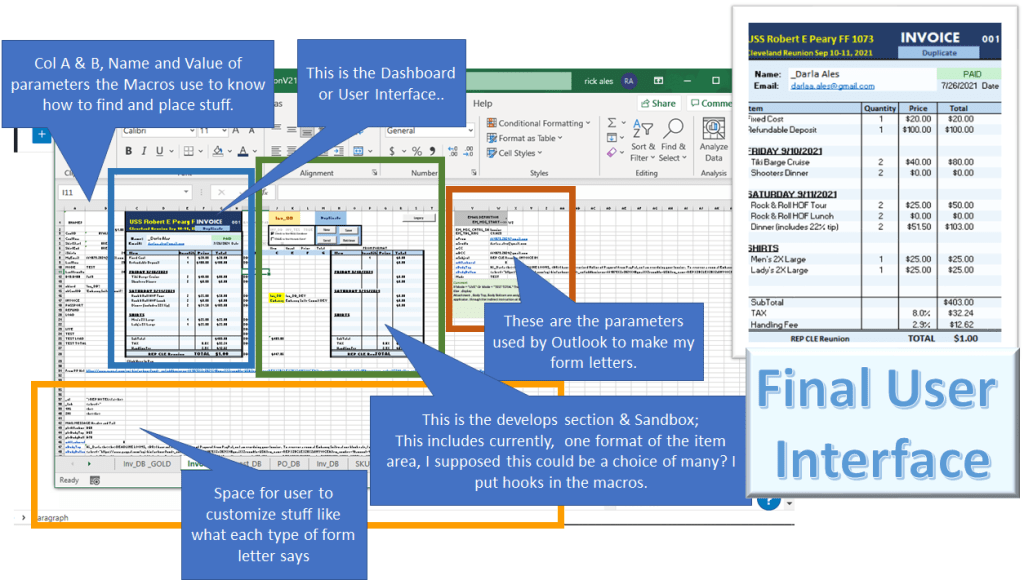
Ramblings 8/17
This tool has grown out of necessity. It’s far from being complete. Right now I’m using Easy Feedback survey application as my order entry portal — too cheap to buy a e-store. From there, I can export all my orders into two EXCEL worksheet.(XLws). The Guest Information goes into the to the Guest database XLws and on my mailing list while their choices go on to the Purchase Order XLws. All of my current product/event offering and their prices are save in the Inventory & Price List XLws. Now a macro combines these three pieces of data to generate a unit price, to generate a link to my PayPal account then writes an HTML Email with the embedded PayPal link then launched Outlook ready for my review (not ready to trust my coding to allow full automation yet!)
Updates
8/5/2021
Got the Purchase Transaction where it can build an invoice from the PO database (PO_DB) Build a HTML Email form with PayPal “Buy It Now” button. and I can configure the header test message to be included before the form and after the Invoice form.; I am still reviewing each message before I hit the Send button.
8/16/2021
I can now retrieve my Invoices by Invoice ID (serial number) from the Invoice database (Inv_DB) this has become really the transaction database. I’ve added a Transaction state machine so I can report the status of the transaction on my Dashboard. Selecting PASSPORT (what I am calling my receipt coupled with the link for hotel registration) Pressing the NEW button cycles trough the Transaction database, any “DUE” items are checked for PP received Email can compares the Amount Receive to the Amount Build. If they are equal, then I build the Passport email, which I am still reviewing before I send to the actual guest. The it continues to find the next payment option. The two BROWN “Send Passport” arrows are now BLUE. Next up cleaning up what I have and managing the exceptions. I want to add a function that allows me to find transactions that are due, and send a duplicate invoice with a “Gentle Reminder” message.
Lessons Learned or “OH CRAP!” Moments
“It is the Oh crap moments that generate the most important and rigorous system requirements” -Rick Ales, 2021
1. Ask for their Name
So I had used my first Free Survey, which I announced and posted the link on our Facebook reunion page, to build my mailing list and find out other information a reunion might want to know: Name, email, years they were aboard, their rate, the state they live in– all good stuff. Objective 1; build a mailing list of people that want to come– CHECK;
Then I ran three more surveys as polls: #1. to determine the venue: Date & city; #2. to select a Hotel; and #3. to select events and tee shirt design. Using Free Survey ranking tools I had my inventory of product offering determined. After some final discussion on or FB page, I negotiated prices and built my SKU Database (SKU = Stock Keeping Unit– places to track what I have for sale and how much it cost and how many people have purchased and how may are available– for example: the Tiki cruise was limited to 30 guest. This is anonymous so all good– Objective 2: where, when and what we goona do — CHECK;
The next objective Collect money to pay for the What. So I built Free Survey #4 as sign up sheet, basically Here’s want I have and here’s what it costs– how many do you want? Once I know this I and send an Invoice with a link to my PayPal via Outlook, all good — Objective 3: Get paid– CHECK
After I had received about 20 survey replies, I get a call, “Hey Rick. Does your survey figure out automatically who I am? Because I didn’t ask my name.” WHAT???? Sure enough, I had 20 or so people sign up, I knew what they wanted but had now clue who wanted it.
LESSON 1: Ask their Name on EVERYTHING!!!
2. Use Transaction IDs
Your PayPal simple, “Buy Now” button HTML code must include three things: 1. The name of your PP account (where you want PP to put the money); 2. Description of what they are buying; 3. How much they need to pay. Here is the line of HTML to create you button
<a>href =
I was using “REP CLE Reunion” as the description and “REP CLE Reunion -INVOICE” as the email subject line for my sort rule cue. In the beginning it was easy to find an invoice because I just searched by Guest name. Well after a while, guys would change there mind, “Got my wife left me and now my girl fried doesn’t want to come so it’s just gonna be me. Can I change my guest form 2 to 0?” Well Now what? So for each Invoice that goes out through Email, create a transaction ID, this means BE SURE to include the transaction ID in the Description to PayPay so when a guy pays, you know which Invoice he is paying for!
LESSON 2: Put the Transaction ID on everything!
The Purchase Transaction Overview
Like a true sailor, my first objective was to figure out how to get paid. I am using Easy Feedback survey as my E-Store and Check out. I’m still manually copying the survey output into my order-entry XLws but should be easy to automate with time. The main requirement was get an invoice to the guest and a link where they can use their credit card to make payment. When they pay, PayPal send me an email- which I route to a Outlook folder that only holds PayPal payment notification. When that email arrives, I get an alert. Here’s what it looks Like
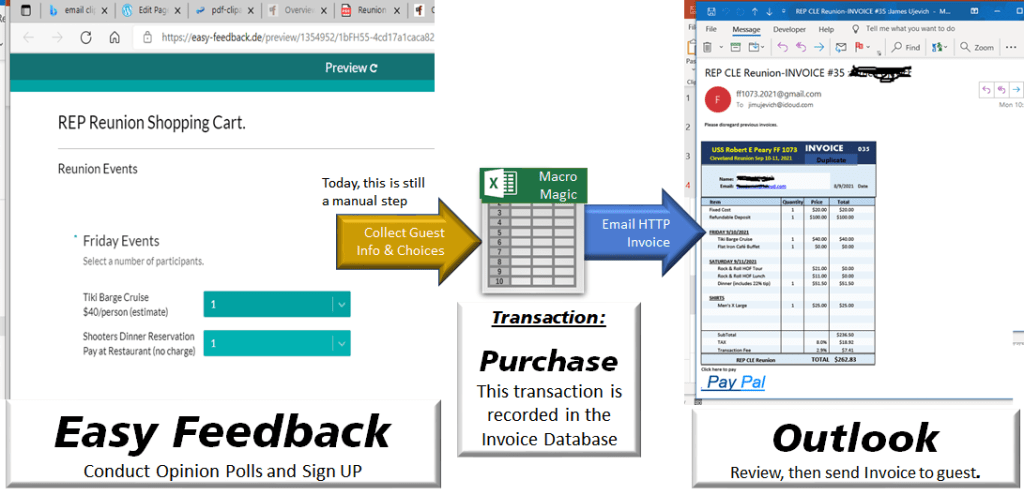
The Key is, the PayPal link so I have working capital, well kinda…. More later. Next up, what to do when the money comes in? Updated 8/10/2021 Standby…. More to come!
Implementation as of 8/17/2021


Problem Statements
- Find out who wants to come.
- How to decide what to do and when to do it?
- How to reliably communicate with Guys from around the world?
- How to get paid.
- Yada Yada Yada
All the moving parts
Problem: I found lots a ton of moving parts. Some of those include:
- Pick a Venue: City and Date
- Pick a Hotel: Price v accommodations
- Plan Meals: Which meals are group events and what to eat.
- Plan Events, Decide what to do for fun as a group.
- Buy Memorabilia: Design & buy Tee Shirts, Coffee Mugs, etc.
Solution: Run a poll
Talk about Facebook polls, Survey Monkey and other free survey tools. Yada Yada Yada
 USS Robert E Peary Reunion